
MTP Playlist Skill
MTP Playlist is an Agent Skill that builds music sequences with the Mapping the Prompt (MTP) framework.
It is not just a mood-based track list.
It maps each track to an MTP node and shapes a playlist that can explain “why this track,” “why this node,” and “why this order.”
It outputs a readable playlist deliverable in Markdown.
Read tracks as placement
Section titled “Read tracks as placement”MTP Playlist treats a playlist like a card deck or a tarot spread.
The left side is Side A (Start and nine nodes); the right is Side B (nine nodes and End). Each track has a distinct role at its position.
Start and End are not nodes on the grid; they are virtual frame nodes (conceptual slots) added for sequence reading.
In MTP Playlist, they are handled as semi-transparent glass nodes that float, shifting toward surrounding nodes according to the assigned track’s character.
For example, if the track at Start is forceful, it drifts toward the Power direction on the Red axis.
Placement itself builds the playlist’s meaning.
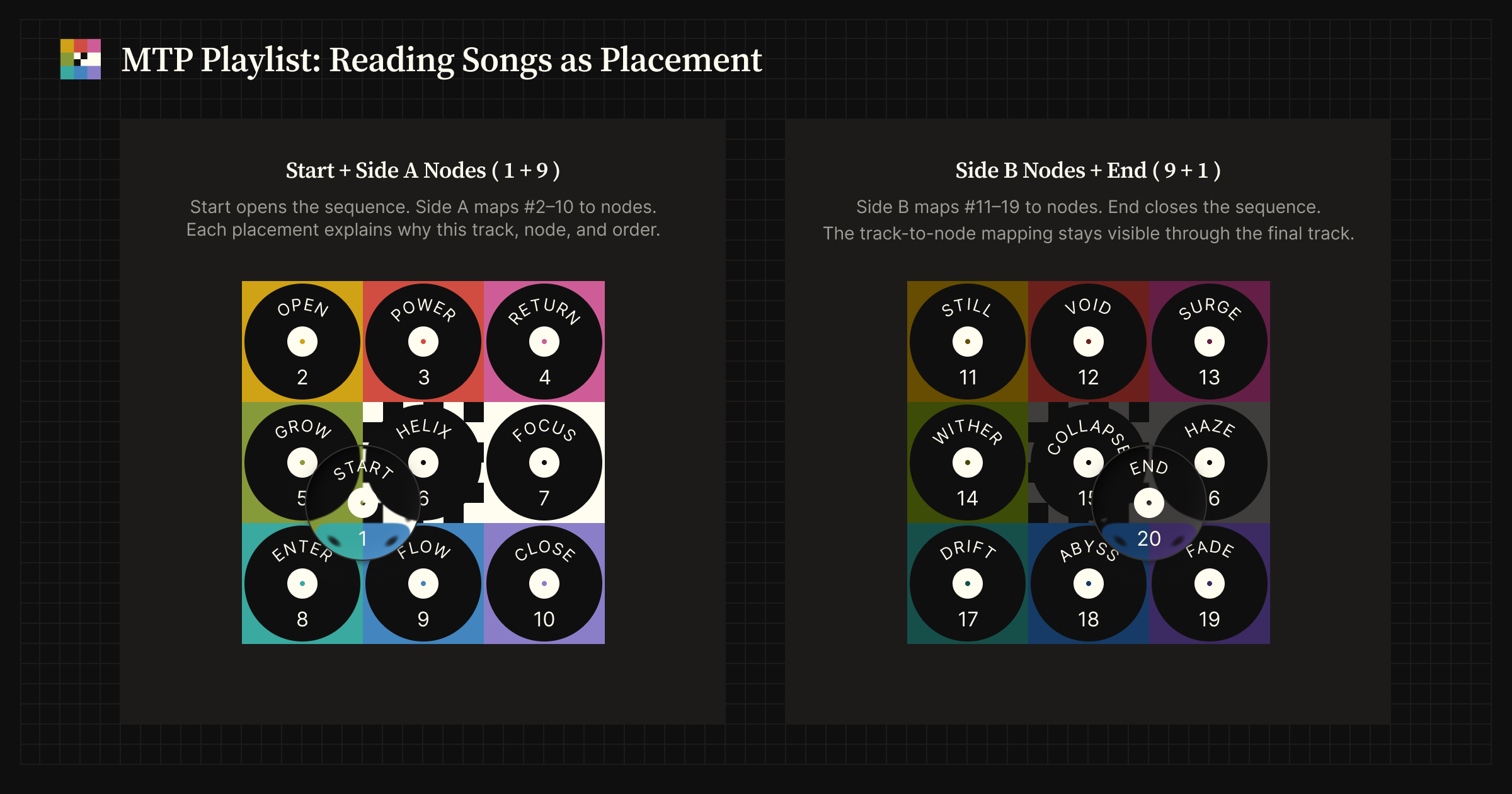
1+9+9+1 Side A (left) and Side B (right).
Basic usage
Section titled “Basic usage”Call the skill explicitly by writing a theme after /mtp-playlist.
Specify an artist, track, or theme
Section titled “Specify an artist, track, or theme”Set the direction of the playlist with a genre, a group or label, an era, a scene, or any keyword.
/mtp-playlist Morning 6AM/mtp-playlist Mozart for Spring, 60-tracks/mtp-playlist Madness in Classical Music/mtp-playlist Mephistophelean Classics/mtp-playlist Modern Jazz with Vibraphone/mtp-playlist Melancholic Bossa Nova and Saudade/mtp-playlist Movie Drive Songs/mtp-playlist Moonlit 80s Heavy Metal/mtp-playlist Motown Deep Cuts/mtp-playlist Michael Jackson, Minor Songs/mtp-playlist Mic Relay 1970s–1980s Rap/mtp-playlist Marley’s Rock/mtp-playlist MDR, Berghain Techno/mtp-playlist Marilyn Manson Side B, David Bowie Side A/mtp-playlist Madonna 2026Anchor a specific track to a specific node
Section titled “Anchor a specific track to a specific node”This is a way to pin a specific track to an MTP node and build the whole flow from there.
Placing a favorite or signature track at Start, Helix, Abyss, Collapse, or another node changes the surrounding selections and the overall impression, even for the same track.
/mtp-playlist Marvin Gaye "Inner City Blues" at Abyss, 70s Soul/mtp-playlist MJB "Real Love" at Helix, 90s R&B/mtp-playlist Mobb Deep "Shook Ones Pt. II" at Start, 90s New York Rap/mtp-playlist Missy Elliott "Get Ur Freak On" at Start, Y2K Hip-Hop/mtp-playlist Merry Christmas Mr. Lawrence at Collapse, PianoPlaylist format
Section titled “Playlist format”By default, it builds a 20-track sequence in a 1+9+9+1 structure.
#1 Start#2–10Side A#11–19Side B#20 End
You can request other sizes explicitly: a 10-track Side A or Side B half, 30 tracks, 40 tracks, 60 tracks, or a shorter mapping when the source has fewer tracks.
For this ordering model, see Mapping and sequence.
What you get
Section titled “What you get”This skill produces a Markdown playlist deliverable.
On its own, the skill does not create a playable playlist.
In ChatGPT with a linked Apple Music account, you can build an Apple Music playlist from the deliverable’s track list.
In that case, you can hand over the “copy-friendly track list” included in the deliverable as is.
It contains the following:
- A title and a short description
- The original prompt
- Playlist metadata
- A copy-friendly track list
- A track-to-node mapping table
- The selection rationale and notes
Each line explains how the assigned track makes its node work.
The explanation rests on what you can actually hear: sound, rhythm, arrangement, vocals, lyrics, production, historical role, function within a scene, and cultural effect.
What MTP Playlist addresses
Section titled “What MTP Playlist addresses”A playlist can end up as a collection of tracks while rarely becoming a single experience that has an order.
MTP Playlist addresses that gap through node placement and explanation.
The intent behind the order
Section titled “The intent behind the order”In many playlists, neither the selection rationale nor the intent behind the order is visible.
Because MTP Playlist gives each track a position and a reason, you can follow the order and its intent not only by listening but also by reading.
Matching conditions versus a musical experience
Section titled “Matching conditions versus a musical experience”AI-generated playlists are good at gathering tracks that match conditions such as genre, mood, era, activity, or artist.
But gathering tracks that match conditions is not the same as building a musical experience that has an order.
MTP Playlist does more than pick tracks: it decides what role each track plays within the sequence.
Balancing the familiar and the discovery
Section titled “Balancing the familiar and the discovery”A playlist that leans too far toward standards feels overly familiar, while adding too many discoveries makes the flow easy to break.
MTP Playlist weighs a track’s role at its position over its popularity.
Well-known tracks are used as anchors or centers.
Deep cuts and peripheral tracks are also chosen when the position calls for them.
How it differs from shuffle
Section titled “How it differs from shuffle”Shuffle can break the familiarity of an order.
But it also destroys the meaning of the order itself.
MTP Playlist does not create freshness by randomizing the order.
It creates a new reading by placing different tracks within the same structure.
Interpretation per model
Section titled “Interpretation per model”MTP Playlist is not a skill for making every model produce the same correct answer.
For the same theme, the selection changes with the model or the curator.
A lightweight model has less time to explore and keeps less context, so it cannot fully review the fit with the surrounding tracks and tends toward a narrower selection.
Because of the training-data cutoff, the latest releases and trends may not be reflected.
Some outputs follow the constraints strictly, while others emphasize narrative or lean on a greater share of signature tracks.
This difference is close to the difference between DJs.
MTP Playlist is a skill for comparing how the selection and the explanation change for the same theme.
Disclaimer
Section titled “Disclaimer”MTP Playlist is a skill that helps with selecting tracks, ordering them, and explaining placement decisions.
It does not address issues with playback environments or streaming services.
- Correcting volume, mastering, or recording differences between tracks
- Performing DJ mixing, crossfades, BPM sync, key matching, or volume automation
- Guaranteeing the availability of each track on Apple Music, Spotify, YouTube Music, or elsewhere
The accuracy of track information depends on the available model, the search environment, and access to music databases.
It also does not assume that it reads your playback history, library, likes, or skip tendencies automatically.